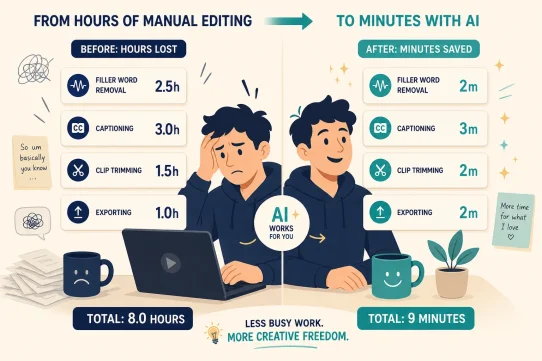



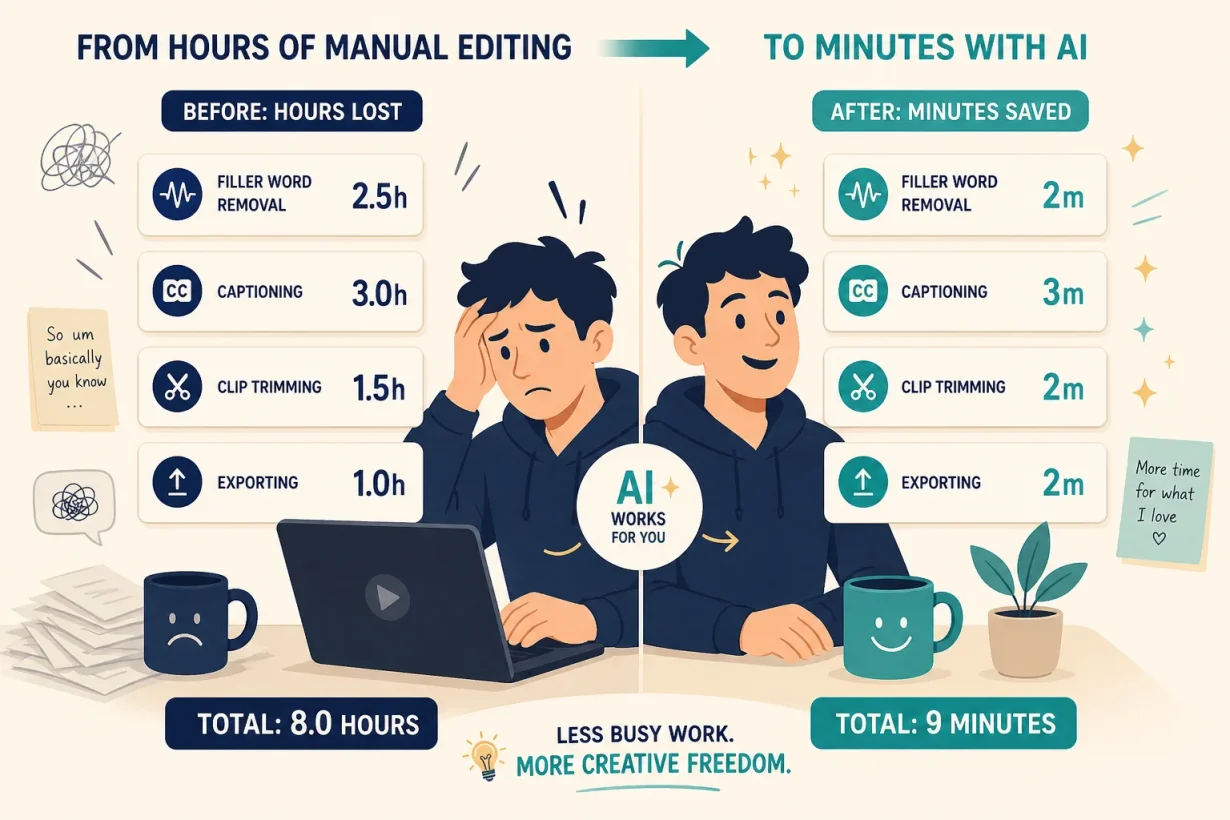

Video editing still takes hours because most creators are using AI for the wrong parts of the workflow. We tested the lecading AI video editing tools across real production scenarios to find what actually compresses timelines without compressing quality. AI tools have cut average one-minute video production from 13 days to 27 minutes. That is not an incremental improvement. It is a different category of work entirely.
What Does It Mean to Use AI to Speed Up Video Editing?
Using AI to speed up video editing is not about generating videos from scratch with a prompt. It is about removing the manual, repetitive parts of your post-production workflow so your editing time goes entirely toward the creative decisions that actually require judgment.
These aren’t filters with machine learning labels. They are editing teammates that transcribe your footage, identify your best moments, remove filler words, generate captions, create social clips, and export platform-ready cuts: all automatically, all without a timeline. AI doesn’t replace your creative eye. It removes everything that was getting in the way of it.
Why You Need AI to Speed Up Video Editing in 2026
Are you still spending more time on post-production than on the content itself?
The average marketing team saves 34 hours per week previously spent on video production and editing after adopting AI tools. For a solo creator, that is the difference between publishing one video per week and publishing five. AI video workflows save 60 to 80% of time compared to conventional editing pipelines, with the largest gains coming from transcription, filler word removal, and social clip generation.
77% of video editing tools now come with AI-driven automation features reducing editing and production time (TechCrunch). The tools that don’t automate the repetitive layer are already becoming obsolete. The creators who are publishing more, faster, and at higher consistency in 2026 are not working harder. They are working on a different workflow entirely.
How to Use AI to Speed Up Video Editing: The 4-Part Workflow
Part 1: Edit by Transcript, Not by Timeline
The single biggest time saving in AI-assisted video editing is transcript-based editing: the ability to cut footage by deleting words rather than scrubbing through a timeline. Descript pioneered this approach and it remains the most impactful AI editing technique available to creators who work with dialogue-heavy content.
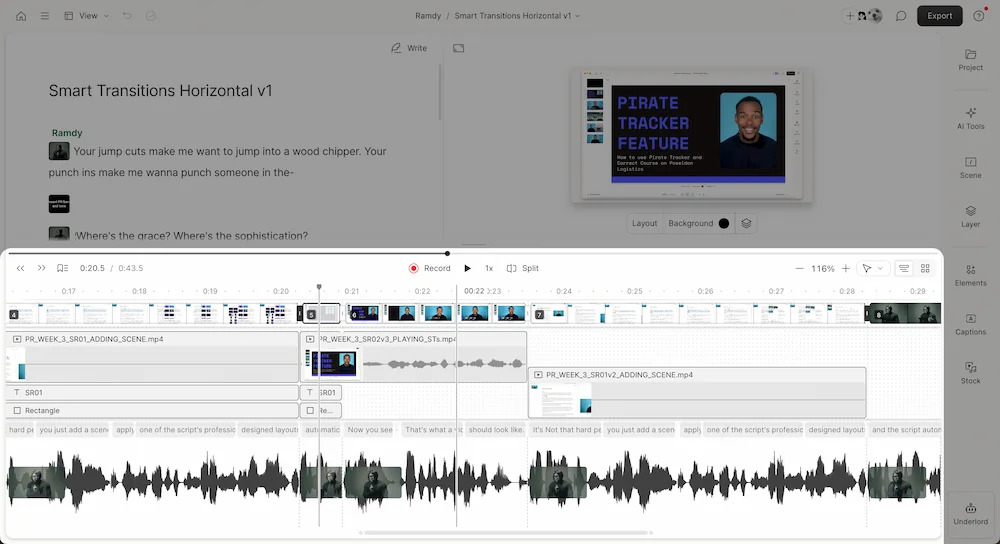
Upload your footage to Descript. The AI transcribes the entire recording with 95%+ accuracy for standard speech. Delete any sentence, phrase, or word from the transcript and the corresponding footage is cut automatically. Remove all filler words (“um,” “uh,” “like,” “you know”) with one click across the entire recording. A 30-minute interview becomes a 12-minute edit in under 20 minutes, without touching a traditional timeline once.
Humans lose 45 minutes per hour of footage scrubbing through clips manually; AI transcribes and marks them in minutes.
Part 2: Automate Social Clip Generation
The second highest-value application of AI to speed up video editing is automated short-form clip generation from long-form footage. Instead of manually watching your full recording and identifying the best 60-second moments for Reels, Shorts, and TikTok, AI analyzes engagement signals, speaker energy, and content structure to identify and assemble the clips automatically.
OpusClip analyzes long-form videos and generates 10 to 15 short-form clips ranked by estimated viral potential. Each clip is auto-captioned, framing-optimized for vertical formats, and exported with platform-specific dimensions in one step. What previously took three hours of manual scrubbing takes under 10 minutes. That compression changes the economics of short-form entirely: one long recording produces a week of social content automatically.
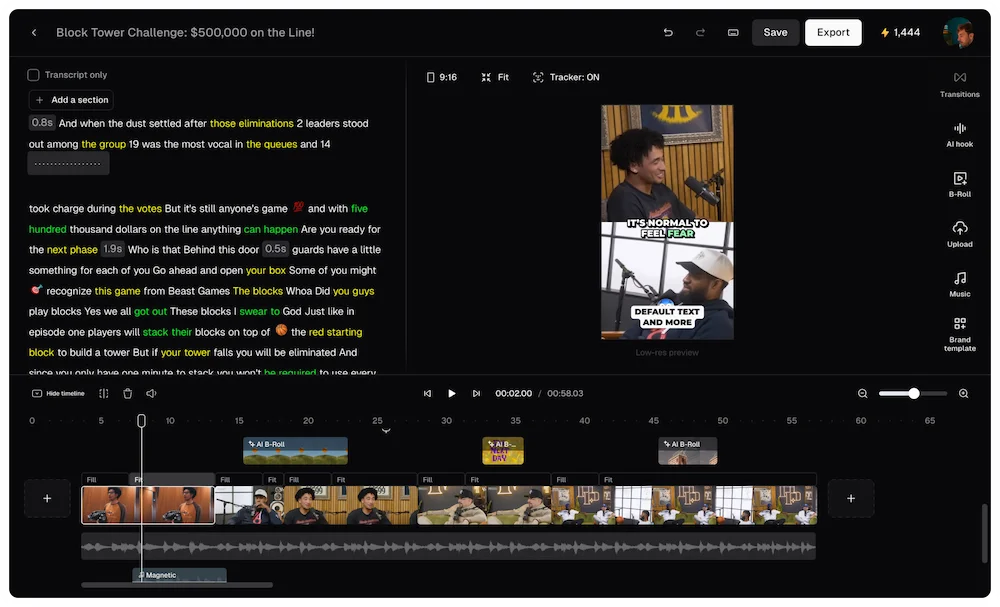
CapCut’s Script-to-Video and Smart Cutout features handle the same workflow for creators who want a mobile-first tool with no subscription required for the core features.
Part 3: Generate Captions and Translations Automatically
Manual captioning is one of the most time-consuming tasks in video post-production and one of the easiest to eliminate entirely with AI. Captions increase average watch time by 12% and are required for accessibility compliance on any professional content, which makes automated captioning both a time saver and a quality improvement simultaneously.
Every serious AI video editing tool now includes automated caption generation. Descript generates captions from its transcript in seconds and allows word-level styling adjustments. CapCut generates captions automatically and applies animated text styles for social-first content. VEED.io offers one-click auto-subtitles with language translation across 100 or more languages, enabling a single video to serve multiple markets without any additional recording.
For creators publishing across languages, AI dubbing now cuts localization costs by up to 90% and reduces production times from months to days, with platforms offering 125 or more language coverage with voice cloning that preserves the original speaker’s tone.
Part 4: Fix Audio and Video Quality With One Click
AI post-processing tools eliminate the final manual layer: audio cleanup and video quality enhancement. Background noise removal, voice isolation, color correction, and stabilization that previously required specialized plugins and manual adjustment now apply automatically in a single step.
Adobe Premiere Pro’s 2026 AI update includes single-click object masking with automatic tracking, Generative Extend for seamlessly adding frames to clips, and Media Intelligence for searching footage by visual content and transcript simultaneously. For creators without an Adobe subscription, VEED.io’s AI audio cleanup and Descript’s Studio Sound feature deliver the same background noise removal and voice enhancement at significantly lower price points.
The combined effect of these four parts is what the data shows across real production teams: enterprises cut video editing time by 90% by rebuilding their workflow around AI capabilities rather than layering AI onto a manual process.
Which AI Video Editing Approach Fits Your Workflow?
Free tools vs. paid tools
You don’t need a paid subscription to start using AI to speed up video editing. CapCut Free covers transcript editing, auto-captions, and smart trimming for short-form content at zero cost. Descript Free includes one hour of transcription per month and filler word removal. VEED.io Free covers auto-subtitling for videos under 10 minutes. That combination handles most solo creator needs before a paid plan makes sense. The paid upgrade threshold: when you’re producing more than four to five videos per week and clip generation volume justifies the subscription cost.
Dialogue-heavy content vs. visual content
Creators working primarily with dialogue (interviews, podcasts, talking-head videos, tutorials) get the highest ROI from transcript-based editing tools. Descript’s transcript editor eliminates the manual scrubbing that consumes the majority of post-production time for this content type. Creators working with primarily visual content (b-roll, product demos, event footage) benefit most from AI color correction, stabilization, and scene detection tools like Adobe Premiere Pro’s AI suite or DaVinci Resolve’s neural engine, which automates the technical enhancement layer without requiring dialogue to work from.
Solo creators vs. production teams
Solo creators need AI video editing tools that compress the full production pipeline into a single workflow a one-person operation can maintain. Descript plus OpusClip covers the core: transcript editing for long-form and automated clip generation for distribution. Production teams need tools with collaboration layers and brand consistency enforcement: Adobe Premiere Pro’s shared project features and Descript’s multi-user workspace handle team editing without the version control chaos of traditional shared drives.
Here’s the short version: if you want to cut your editing time by 70% this week, start with Descript for transcript-based editing and OpusClip for social clips. Both have free plans. Both deliver immediate results without any technical setup. Humans scrub timelines; AI reads transcripts.
Start Editing Faster Today
Using AI to speed up video editing shouldn’t feel like learning a new tool. It should feel like hiring a post-production assistant who handles the repetitive work while you focus on the creative decisions that make your content worth watching.
Want to see how AI video editing fits into a complete content production system? Read our complete guide to the best AI tools for content creators in 2026 to see every part of the workflow.
Frequently Asked Questions
How much time does AI actually save in video editing?
AI tools save 60 to 80% of time compared to conventional editing pipelines. The average one-minute marketing video that previously took 13 days to produce now takes 27 minutes with AI tools. For solo creators, transcript-based editing alone typically recovers 45 minutes per hour of raw footage that would otherwise be spent on manual scrubbing.
What is the best free AI tool to speed up video editing?
CapCut Free is the strongest free AI tool to speed up video editing for short-form creators, covering auto-captions, smart trimming, and transcript editing with no subscription required. Descript Free includes one hour of transcription per month with filler word removal. VEED.io Free covers auto-subtitling for shorter videos. All three deliver immediate time savings with zero upfront cost.
Can I use AI to speed up video editing without learning a new workflow?
Yes. Descript’s transcript-based editing requires no timeline skills: if you can edit a Google Doc, you can edit a video in Descript. CapCut’s AI tools are designed for creators with no professional editing background. OpusClip generates social clips automatically from a long-form upload with no manual configuration. The learning curve for each is measured in minutes, not hours.
What parts of video editing does AI speed up the most?
The highest time savings come from transcription and filler word removal (Descript), social clip generation (OpusClip), automated captioning and translation (VEED.io, CapCut), and audio cleanup and noise removal (Adobe Premiere Pro AI, Descript Studio Sound). These are the tasks that consume the most time in a typical editing workflow and require the least creative judgment.
Do I need expensive software to use AI to speed up video editing?
No. The most impactful AI video editing features are available on free plans or at entry-level pricing: Descript Creator at $24/month, OpusClip free plan, CapCut free, and VEED.io free cover the core workflow. Adobe Premiere Pro ($22/month) and DaVinci Resolve (free for the core version) cover the professional tier. You can cut your editing time significantly before spending anything.
How does AI video editing handle different types of content?
AI transcript editing works best for dialogue-heavy content: interviews, podcasts, tutorials, and talking-head videos where the speech track drives the edit. AI color correction, stabilization, and scene detection work best for visual content: b-roll, events, and product videos where the visual track is primary. Most creators benefit from both approaches applied to different stages of the same project.