





Most AI calendar tools promise to protect your focus time. Most of them just move meetings around. We tested Reclaim AI and Motion for 90 days against real deep work schedules to find which one actually defends the hours that matter. The difference isn’t features. It’s philosophy. And it determines everything.
What Are Reclaim AI and Motion?
These aren’t just smarter calendar apps. They are scheduling teammates that use AI to protect your most productive hours from the meeting creep, context switching, and calendar fragmentation that makes deep work feel impossible.
The distinction between them is fundamental. Motion is an AI that owns your schedule. You add tasks, set deadlines and priorities, and Motion decides when to do everything, rebuilding your day automatically when priorities shift. Reclaim AI is an AI that protects your schedule. It works alongside your existing calendar, defends your focus blocks and habits from meeting overrides, and syncs tasks from the tools you already use without replacing any of them. One takes control. The other amplifies control you already have.
Why the Reclaim AI vs Motion Decision Matters in 2026
Are you losing deep work hours to meetings that could have been scheduled around your focus blocks?
Reclaim AI’s Focus Time feature recovered 10 hours of deep work weekly in direct testing, by automatically protecting the most productive hours from low-priority meeting requests. Motion requires two to four weeks of patient configuration before it delivers full value, with users who skip the setup phase consistently reporting disappointing results.
The key question is whether you want AI to own your schedule or protect your schedule. That single distinction determines which tool you should choose before you evaluate a single feature.
Reclaim AI vs Motion: Head-to-Head Comparison
| Reclaim AI | Motion | |
|---|---|---|
| Philosophy | Protects your schedule | Owns your schedule |
| Setup time | 15 minutes | 2 to 4 weeks |
| Free plan | Yes (3 habits, functional) | No (7-day trial only) |
| Price | From $8/month | From $19/month |
| Best for | Deep work protection | Full schedule automation |
| Task management | Syncs from existing tools | Replaces your task manager |
| Mobile app | No (2026 gap) | Yes |
| Habit scheduling | Yes, core feature | Limited |
Reclaim AI: Best for Deep Work Protection
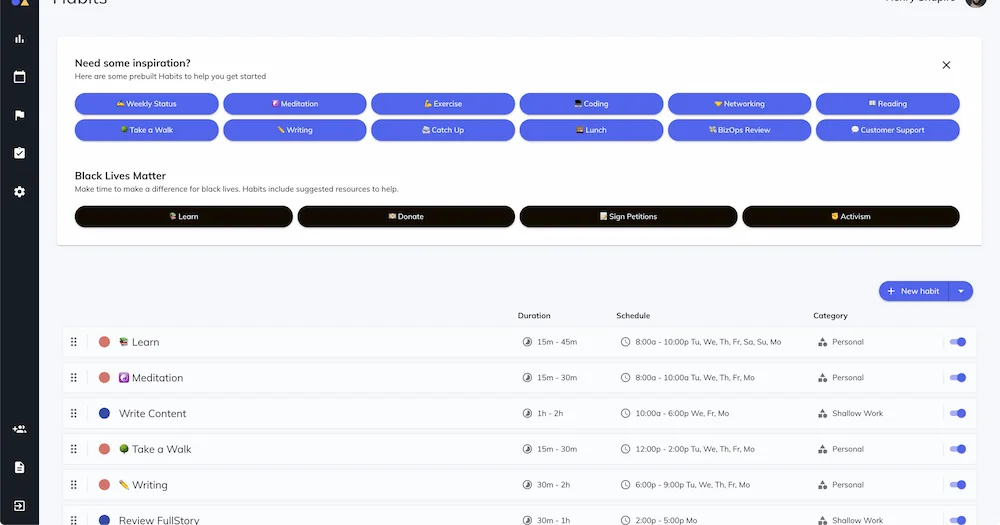
You set a weekly focus time goal of 15 hours of deep work, and Reclaim automatically fills your calendar with focus blocks around your meetings. When new meetings get added, Reclaim adjusts the blocks to compensate.
Key features:
- Focus Time protection: Learns your most productive hours and defends them automatically from low-priority meeting requests.
- Habit scheduling: Creates flexible recurring blocks for deep work, exercise, or any routine, and reschedules them intelligently when conflicts arise rather than simply losing them.
- PM tool sync: Connects with Asana, Todoist, ClickUp, Jira, and Linear so tasks from your existing tools auto-schedule into your calendar without manual entry.
- Smart scheduling links: Shows only genuinely available times that don’t conflict with your protected focus blocks.
Pros:
- Invisible operation, Reclaim works in the background without demanding daily attention or configuration. Your tools stay the same; your calendar just gets smarter.
- Lowest friction entry, operational in 15 minutes from a calendar connection, with a free plan that covers the core deep work use case indefinitely.
Cons:
- No mobile app, a significant gap in 2026 for professionals who manage schedules on the go.
- Light on project management, Reclaim is a calendar protection layer, not a task manager replacement. If you need project dependencies and workload views, you keep your existing PM tool alongside it.
Pricing:
| Plan | Price | Details |
|---|---|---|
| Lite | Free | 3 habits, basic task sync |
| Starter | $8/month | Unlimited habits, analytics |
| Business | $12/month | Team features |
For solo creators and knowledge workers whose primary problem is meetings eating their focus time, Reclaim AI is the more precise solution at a fraction of the cost.
Motion: Best for Full Schedule Automation
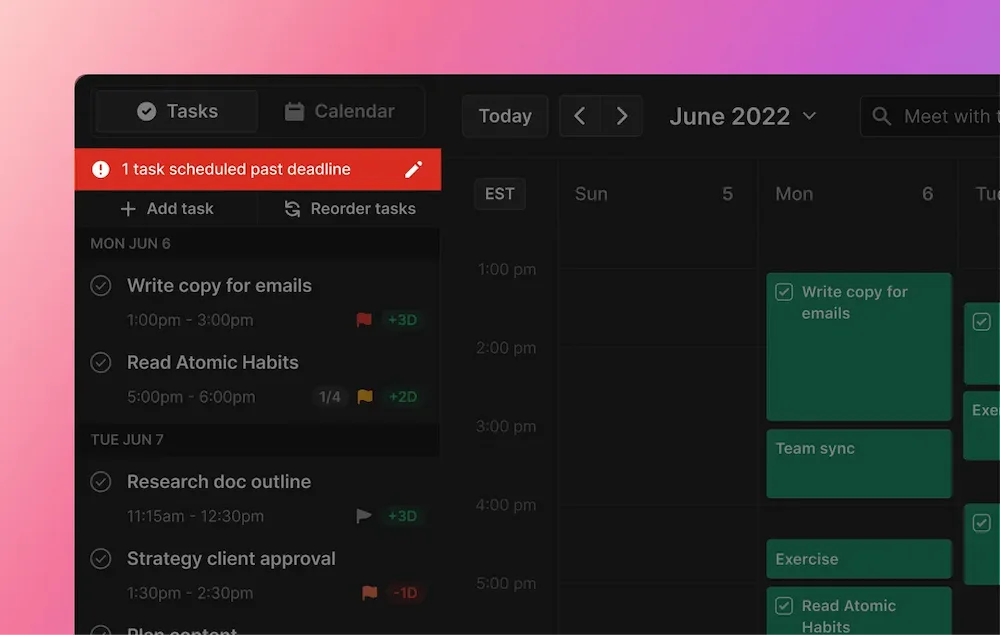
Motion is the only tool that genuinely surprised us in 90 days of testing. It doesn’t just show you your schedule. It builds it. Add a task with a deadline and priority, and Motion decides when to do it, automatically rescheduling around every new meeting and overrun in real time. By week two, it makes better scheduling decisions than most people do manually.
Key features:
- Full AI scheduling: Every task is automatically placed into the optimal calendar slot based on priority, deadline, and available time. No manual scheduling decisions required.
- Real-time rescheduling: When meetings move or priorities change, Motion rebuilds the entire schedule automatically without user intervention.
- Project management included: Tasks, projects, dependencies, and workload views are built in, replacing the need for a separate PM tool.
- Team coordination: Shows team capacity and workload before scheduling meetings, preventing focus time fragmentation across multiple people.
Pros:
- Eliminates decision fatigue entirely, once configured, you stop spending mental energy on “when should I do this?” The AI handles every scheduling decision.
- Most powerful for teams, shared project visibility and AI-coordinated team scheduling justify the higher price point for anyone managing multiple people.
Cons:
- Two to four week setup investment, the AI delivers full value only after tasks, projects, and priorities are correctly configured. Users who skip this phase consistently underperform.
- Requires full surrender, Motion works best when you stop overriding its decisions. Most people find that degree of AI control uncomfortable at first.
Pricing:
| Plan | Price | Details |
|---|---|---|
| Individual | $19/month (annual) | Full AI scheduling |
| Team | $20/user/month | Collaborative planning |
For professionals willing to invest in a two-week setup and genuinely trust the AI with their schedule, Motion delivers a level of scheduling optimization no manual system can match.
Reclaim AI vs Motion: Which One Is Right for You?
Deep work protection vs. full schedule ownership
If your core problem is meetings eating your focus time and you want AI to defend your existing schedule without replacing it, Reclaim AI solves that problem more precisely and at a fraction of Motion’s cost. If your core problem is decision fatigue across a complex task load and you want to stop thinking about scheduling entirely, Motion is the right tool. The same AI philosophy that makes Motion powerful makes Reclaim unnecessary, and vice versa.
Solo knowledge workers vs. team leads
Solo knowledge workers with an established task manager get full value from Reclaim’s calendar protection layer without paying for project management features they already have elsewhere. Team leads coordinating multiple people’s schedules and workloads get the highest ROI from Motion’s team capacity views and AI-coordinated meeting scheduling, which deliver capabilities Reclaim’s simpler team features don’t match.
Low setup tolerance vs. high configuration investment
Reclaim AI is operational in 15 minutes. Its value is immediate and compounds quietly over time without ongoing configuration. Motion requires two to four weeks of proper setup before its AI makes genuinely good decisions. That investment pays off, but it requires patience and commitment that many users don’t sustain through the adjustment period. Humans give up on complex setups; both tools run indefinitely once configured correctly.
Here’s the short version: if your calendar is being eaten by meetings and you want it back, start with Reclaim AI. If you want to stop thinking about your schedule entirely and trust an AI to run it, Motion is worth the setup investment. They solve the same problem from opposite directions. Pick the direction that matches how you want to work.
Start Protecting Your Deep Work Today
The best AI calendar for deep work shouldn’t feel like a system you manage on top of your actual work. It should feel like the scheduling teammate that handles the calendar decisions so you can focus on the work that actually moves the needle.
Read our complete guide to the best AI productivity tools in 2026 to see every layer of the stack.
Frequently Asked Questions
Which is better for deep work: Reclaim AI or Motion?
Reclaim AI is better for deep work protection specifically. Its Focus Time feature automatically defends your most productive hours from meeting requests and recovered 10 hours of deep work weekly in direct testing. Motion is better for full schedule automation, which includes deep work time blocking as part of a broader AI-managed schedule.
What is the main difference between Reclaim AI and Motion?
The fundamental difference is the degree of AI control. Motion owns your schedule: you add tasks and the AI decides when to do everything. Reclaim AI protects your schedule: it works alongside your existing calendar and tools, defending focus blocks and habits without replacing the systems you already use.
Does Reclaim AI have a free plan in 2026?
Yes. Reclaim AI’s Lite plan is free forever and includes 3 habits, basic task sync, and calendar protection. It is genuinely functional for individual deep work use, not a crippled demo. Motion has no free plan, only a 7-day trial that requires a credit card.
Is Motion worth the price compared to Reclaim AI for deep work?
Motion at $19/month is worth the price if you manage a complex task load across multiple projects and are willing to invest two to four weeks in proper setup. For solo creators and knowledge workers whose primary problem is focus time protection rather than full schedule automation, Reclaim AI at $8/month delivers better deep work ROI.
Can you use Reclaim AI and Motion together?
Technically yes, but practically it creates conflicts rather than value. Both tools want to schedule tasks onto your calendar simultaneously, which generates competing blocks rather than complementary ones. Choose one based on whether you want AI to own or protect your schedule.
Which is easier to set up: Reclaim AI or Motion?
Reclaim AI is significantly easier. It is operational in 15 minutes from a calendar connection with no configuration required beyond setting your focus time goals and habits. Motion requires two to four weeks of setup to configure tasks, projects, priorities, and work preferences before the AI makes reliably good scheduling decisions.